

Every designer you interview hands you a portfolio, and they all look good, because a portfolio is a best-of reel. Here is the answer first: a portfolio proves a designer can build a certain kind of website, and nothing else. It does not prove they deliver on time, communicate clearly, or respect your budget. So the skill in how to evaluate a web design portfolio is separating what it can prove from what it cannot, and the fastest method is seven checks you can run in about fifteen minutes, including opening the sites on your own phone.
This guide gives you the seven checks, the way to test the live sites yourself, the red flags that reveal templates and outsourced work, and how to turn what you see into questions for the interview. It is the “look at the work” step of choosing a designer, and it sits alongside two existing guides: our questions to ask a web designer for the “listen to the answers” step, and our web designer red flags for the “watch their behaviour” step. Together the three cover the whole hiring conversation.
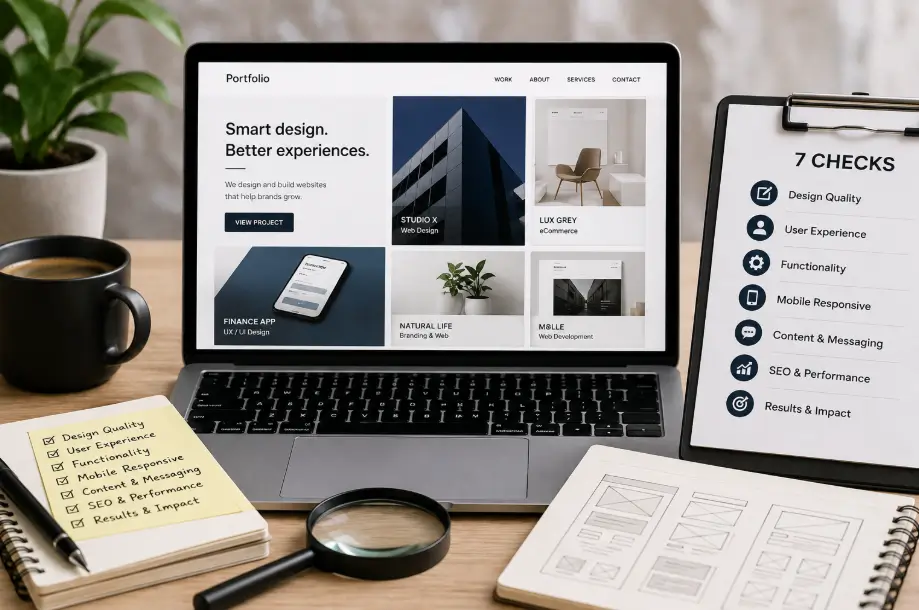
Key Takeaways
Evaluate any web design portfolio with seven checks in about fifteen minutes, then test the live sites on your own phone.
- A portfolio proves a designer can produce a certain kind of work; it does not prove they deliver on time, communicate, or respect your budget.
- Run seven checks in about fifteen minutes: relevance, recency, role clarity, live-site testing, business results, client type match, and hidden facts.
- Open the sites on your phone and use them the way a customer would. A live, working site that loads fast beats a folder of beautiful screenshots.
- The most dangerous portfolio is not the weak one, it is the one that looks real but is a template or outsourced work sold as custom.
- Turn every check into a question for the interview. What you see in the portfolio is the start of the conversation, not the end of it.
What a Portfolio Is Actually Showing You
A portfolio is a curated selection of a designer’s past work, which means it has already been filtered for you: only the best-looking and most successful projects make the cut, and the failures, the missed deadlines, and the awkward clients do not. That is normal and it is not dishonest. What it means is that you are looking at a best case, so you need to know what that best case can and cannot prove.
What a portfolio can prove is that the designer is capable of producing a certain kind of effect: a clean layout, a fast-loading site, a specific style. What it cannot prove is how the project actually went. It cannot prove the site was delivered on time, that the client was happy, or that the design converted visitors into customers. The portfolio shows the finished product; the interview and the client references show the process.
Recency matters here too. A portfolio built from work done three years ago tells you what the designer could do three years ago, not what they can do with today’s tooling and standards. Websites and design trends move quickly, and a designer who has not shipped anything recent is a designer you cannot evaluate fairly. So the order of operations is: first check what the portfolio can prove, then look at whether it is good.
The 7 Checks: How to Evaluate a Web Design Portfolio
Run every portfolio through these seven checks, in order. Any one of them can rule a designer in or out, and doing all seven takes about fifteen minutes, most of it spent opening websites on your phone.
- Relevance. Is the work for businesses like yours or in a similar industry? A portfolio full of SaaS dashboards tells you little about whether this designer can build a strong site for a local service business. Look for work that matches your industry, your site type, and your customer.
- Recency. Was the work built recently? Ask for the most recent twelve months. A designer whose latest project is two or three years old is harder to evaluate, because their current skill level is unknown.
- Role clarity. What did the designer actually do? A portfolio can show a project the designer only touched the design of, or only the development of, or only the copy of. Ask which parts they did themselves and which were another person’s. This is the check that separates a real custom build from a template with a logo swapped in.
- Live-site testing. Open the sites yourself, on your phone, and use them the way a customer would. This is important enough that it gets its own section below.
- Business results. Did the site achieve a business outcome, not just look good? Ask what the site was meant to do and whether it did it. A designer who tracks results and can talk about them is a different kind of hire from one who only collects screenshots.
- Client type match. Does the designer’s past client size and budget match yours? An agency that builds for large enterprises may not be the right fit for a small business, no matter how impressive the work. Look for clients whose scale and needs resemble yours.
- Hidden facts. What is not shown? Template work sold as custom, third-party tools stitched together, and sites that were never actually launched all tend to hide behind a carefully cropped screenshot. The section below on misleading portfolios shows how to spot these.
If you are still narrowing down who to interview, our how to choose a web designer guide walks through the full selection process, and this portfolio method is step four of it.
Test the Sites Yourself, on Your Phone
The single fastest way to evaluate a portfolio is to stop looking at screenshots and start using the sites. Open each one on your phone, ideally with the wifi off or on a slow connection, and move through it the way a real customer would. This is the check that reveals more than all the others combined.
Ask these questions as you move through a site:
- Does it load quickly? On your phone, on a normal connection, does the page feel fast? A site that takes many seconds to load on mobile is a conversion problem, not a cosmetic one.
- Is the message clear in seconds? Within about five seconds, can you tell what this business sells and how to contact them? If you have to hunt for it, the design is not doing its job.
- Can you complete the main action in a few steps? Whether the main action is calling, booking, or buying, it should be reachable in about three taps from the home screen. Count the steps for each site.
- Is it genuinely mobile-friendly? Buttons sized for thumbs, no horizontal scrolling, readable text without zooming. A site that looks fine on desktop but fights you on mobile tells you the designer does not test the way customers experience it.
PageSpeed scores are a useful secondary signal, but do not treat the number as the verdict. A fast score does not mean the site is clear or easy to use, and a slow score on a demo site does not tell you everything about the production build. Google’s own Core Web Vitals guidance (web.dev) explains the field metrics behind the score; use the real-feel test as the primary signal and the score as a check on your impression. When you interview the designer, our list of questions includes asking directly whether they built this site themselves and when, which ties the test back to the role-clarity check above.
When a Portfolio Is Misleading: Templates and Outsourcing
The portfolio to be most careful with is not the weak one, it is the one that looks real but is not what it claims to be. Two patterns do most of the damage, and both hide behind a good screenshot.
Template work sold as custom. A designer buys a premium theme, changes the logo and colours, and presents it as a custom build. The site looks fine, but you are paying custom-design prices for work that someone else designed. The giveaway is repetition: browse several projects and look for the same layout bones, the same section order, the same fonts and spacing across different “clients.” A genuine custom design varies; a template repeats.
Outsourced work. The person you are interviewing takes the project and passes it to a third party, often overseas, who does the actual build. You signed a contract with someone who is not doing the work. This is harder to spot from the portfolio alone, which is why the live-site test and the role-clarity question matter: ask which parts of a project they personally did, and ask to see the admin or the source of a site you like, not just the front page.
To test for both, pick one or two projects in the portfolio and ask: “What is the custom part of this site?” A designer who can point to the specific custom work, and show you it in the live site, is telling the truth. A designer who talks around the question is not. This connects directly to the red flags in our red flags guide, where a portfolio that is only screenshots or only mockups is called out as a serious warning sign.
Portfolio Red Flags vs Green Flags
Here is a quick side-by-side reference for when you are moving fast. No single flag is a verdict on its own, but several red flags together should end the conversation.
| Green flags | Red flags |
|---|---|
| Recent work for businesses like yours, live and testable | Only screenshots, only mockups, or work “under NDA” you cannot open |
| Can say clearly what they did on each project | Avoids the question of what they personally did |
| Talks about business results, not just aesthetics | Only talks about how good the sites look |
| Welcomes you testing the sites and asking about the work | Hesitates, makes excuses, or steers you back to the screenshots |
Treat a red flag as a reason to ask a follow-up question, not as an instant dismissal. A designer under a strict NDA may genuinely be limited, and one weak project in a strong portfolio is normal. The pattern that matters is the accumulation: one red flag is a question, two is a concern, three is a stop. Our red flags guide has the full list of behavioural warning signs to watch for beyond the portfolio itself.
How to Use the Portfolio in the Hiring Conversation
The portfolio is not the end of the evaluation, it is the beginning of the interview. Turn each of the seven checks into a question and let the designer walk you through their work. How they answer tells you as much as the work itself.
- Role clarity: you have already checked what they did on the project; now ask them to walk you through it. Listen for a specific answer about design, development, or copy, not a vague “I did the whole thing.”
- Business results: “What was this site meant to achieve, and did it?” A designer who can name a result, even a modest one, is thinking in outcomes. A designer who only describes the layout is thinking in aesthetics.
- Recency: “What have you built in the last twelve months?” This pushes past the curated best-of and shows you the current work.
- Custom vs template: “What is the custom part of this design?” Use the answer to judge whether you would be paying for original work or a theme.
These questions fit naturally into our 18 questions to ask a web designer, which covers the rest of the hiring conversation. Between the portfolio checks here and the interview questions there, you will have both what you can see and what you can hear before you decide.
Frequently Asked Questions
How do I evaluate a web design portfolio?
Run the seven checks in this guide in about fifteen minutes: relevance to your industry, recency of the work, role clarity (what the designer actually did), live-site testing on your phone, business results, client type match, and hidden facts like templates or outsourced work. The most telling check is opening each site on your own phone and using it the way a customer would.
What should a web designer’s portfolio include?
Recent, live websites for businesses like yours, with a clear statement of what the designer did on each one and, where possible, a business result. A portfolio of only screenshots or mockups, with no live sites you can open and test, is a weak signal no matter how good the images look.
How can I tell if a portfolio is fake or templated?
Look for repetition across projects: the same layout bones, fonts, and section order in different “clients” suggest one template. Ask for a specific site’s admin or source, not just the front page, and ask what the custom part of a project is. A designer who can point to the specific custom work in the live site is telling the truth.
Should I only look at portfolios from my industry?
Relevance is a strong signal, but not a hard requirement. A designer who has built for businesses like yours already knows your customer, which lowers risk. At the same time, look across industries for signs of craft: clean layouts, fast mobile sites, and clear conversion paths. A designer who does strong work in another industry can often do strong work for you.
Conclusion
A portfolio is evidence, not a promise. It can show you what a designer is capable of building, and nothing else, so evaluate it with the seven checks, test the live sites on your own phone, watch for templates and outsourced work, and turn what you see into questions for the interview. Between this guide, our interview questions, and our red flags list, you now have the whole hiring conversation covered. If you would like to see live client work from an Australian agency that can explain exactly what each site was built to achieve, talk to us or explore our custom website development service, or browse our portfolio and test those sites yourself.
